This is an 'unofficial' user manual for Open Live Writer. In the days of Windows Live Writer, there was never an official user manual for the application from Microsoft, just a bunch of websites with some how to's.
I decided to write this manual for all the people who might like to have an user manual for Open Live Writer going forward. It covers every function Open Live Writer has from downloading it from the website to the information in the About option.
If you aren't sure, Open Live Writer is an offline blog editor that was once called Windows Live Writer; from Microsoft. Microsoft abandoned the application because it didn't fit their business model for their 'Windows Live' blog platform. Thankfully a group of developers, that happened to love Windows Live Writer, worked with Microsoft to take over the project and make it open source.
Just so you know, this is a 'living user manual' for Open Live Writer; meaning it'll be updated as new features and functions are included with the application.
You can download it from here.
http://www.lehsys.com/open-live-writer-user-manual/
Open Live Writer – User Manual [CHM]


Windows Live Writer 2012 - Working With Images

I was in the Windows Live Writer support forum the other day and I was trying to assist someone who was having problems with posting clear images to Blogger. Apparently the original images that she was trying to attach was fairly large and when she tried to attach them to her blog post, the images looked okay but once the article was published, she indicated that the images that she was working with or had inserted, were now blurry.
This topic got me thinking about how Windows Live Writer works with images that are inserted into blog posts.
Windows Live Writer: How to Add Images/Pictures to a Post

Windows Live Writer is a fantastic offline blogging tool with a WYSIWYG editor. It interfaces with just about any blog service [Blogger, LiveJournal, TypePad, WordPress, etc.] If you're a blogger you'll find this tool incredibly helpful- and it's refreshingly free from Microsoft.
But for the point of adding images to Windows Live Writer, I thought I would do a quick post on it.
Windows Live Writer 2012: Fast and Easy Image Editing with the Sharper Photo Plug-in

When you're working on a post in Windows Live Writer it's important not to be slowed down by having to mess with a bunch of arduous graphic programs to try to point out highlight and draw attention to certain features and functions.
Windows Live Writer has some basic functions as far as editing goes, but if you really want to get detailed with image markup, resizing and adjusting the quality of the images that are being inserted, and ultimately posted to your blog, being able to edit those images quickly is going to be almost invaluable.
So while Windows Live Writer does have some basic image editing options it actually works better if you have the option to edit the image, while you're in the composition phase, using your own choice graphic editor.
Windows Live Writer 2012: How To Return The Plug-in Sidebar

If you were among the many that were using Windows Live Writer 2009, you probably remember having a plug-in bar on the right hand side of the composition window; having direct access to the plug-ins that you have installed for Windows Live Writer. When Windows Live Writer got updated with the new user interface, Microsoft removed the sidebar. A completely asinine thing to do, considering how useful the sidebar was. Additionally, it left a ton of free/open space in the composition window that's holistically wasted.
One of the very first things that popped up in the Windows Live Writer support forums with the redesign of the GUI, was a request to reinstate the sidebar. Of course Microsoft never answered and the loyal users that use Windows Live Writer on a regular basis have been left in the dark ever since.
But you really have to have respect for those independent developers out there that recognize that something is wrong, but it can be fixed with some additional code. Enter JoseNet.
A new version of Windows Live Writer 2012 is out and nothing is new- so disappointing

Microsoft released a new version of Windows Live Writer this morning and I'm utterly disgusted with what Microsoft considers a new version. Nothing is new with the latest version. Hell, even the name is the same 'Windows Live Writer'.
Microsoft said Windows 'Live' is dead; it's supposed to be just Windows Essentials Writer. What the heck are they doing over there? The last update to Windows Live Writer was the so-called improvement by removing the sidebar and changing the toolbars to ribbon GUI's.
And they had yet to add a 'FIND and REPLACE' to the application.
The latest version was just released and there's nothing new about the application. Microsoft is nice enough not to tell anyone 'what's new' about the new application, so this becomes a scavenger hunt to see if people can find out what's new with Windows Live Writer.
Windows Live Writer users: We're going to miss you Zemanta…

I don't know when Zemanta stopped officially supporting Windows Live Writer as a plug-in, but I was pretty disappointed the other day when I received an e-mail from their support forum indicating that Zemanta had stopped supporting Windows Live Writer and moved on to strictly web-based blogging services.
The fight to save Windows Live Writer

When Windows Live Writer was released, I'm sure it was meant as a complement to the blogging service that Microsoft was planning to offer to its users/members, in the form of Windows Live Spaces.
Overall, Microsoft has a real problem with project concept and follow through.
Microsoft thought that if they purchased some blogging software, and set up their own blogosphere [if you build it, they will come] that would be a huge hit for Microsoft, but the problem is, Microsoft purchased a small company that was producing an off-line blog editing application; they simply thought that if they threw up a blogging service like Windows live Spaces, people would just come in droves.
The reality is that Windows Live Spaces may have been a noble concept, but the execution Windows Live Spaces was simply just not given enough attention. There were so many things wrong with Windows Live Spaces that people chose simply not the blog with Microsoft; there was just too many features that were lacking, too many options that just weren't there…
So Microsoft killed Windows Live Spaces…
Microsoft killed Windows Live Spaces and advised all their users to transition their Windows Live Spaces accounts and information over to WordPress. WordPress was Microsoft's direct competition for Windows Live Spaces and was on a daily basis outperforming Windows Live Spaces at every point… Microsoft's perspective was that there was no way for them to beat WordPress; they were simply going to throw in the towel…
But where does that leave Windows Live Writer?
Windows Live Writer: Inserting/embedding a MP3
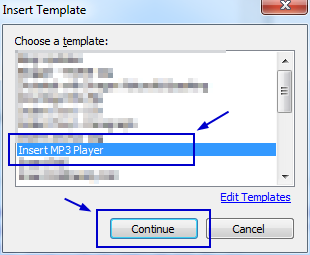 Windows Live Writer is a fantastic offline blogging tool with a WYSIWYG editor. It interfaces with just about any blog service [Blogger, LiveJournal, TypePad, WordPress, etc.] If you're a blogger you'll find this tool incredibly helpful- and it's refreshingly free from Microsoft.
 I was knocking around the other day and started working with a music creator; I found the process of creating music really nice and I wanted to share the music in a blog post, but Windows Live Writer doesn't have a music import/link or any kind of way to have users link to a MP3 and leter readers just listen/stream the music directly from the site.
I checked the Windows Live Writer plug-in site. I found a plug-in to insert music, but it didn't' work; in fact it caused my version of Windows Live Writer to crash completely. Windows Live Writer was not liking the plug-in at all [or maybe the code it injected].
But I did find a better way to do it…
I have used a plug-in on Windows Live Writer several time and each time, it just seems to do the trick...
2012: Windows Live Writer Top 10 Plug-ins - Most Useful

A large number of bloggers use Windows and use Windows Live Writer to post to their blogs from virtually anywhere. Windows Live Writer is considered the bar at which all other offline blog editors are judged.
One of the things that makes Windows Live Writer so popular is the ability to edit and compose your articles in a WYSIWYG editor. So as you are composing, what you are looking at is exactly how it's going to look one the information has been published. But another reason is the fact that the application has the ability to extend it's abilities to do other things not natively covered; allowing outside developers to generate plug-ins that'll enrich the overall experience and functionality of Windows Live Writer.
I have compiled a list of uber-useful plug-ins that are the most common and suggested plug-ins from the Windows Live Writer support forum from this year 2011 [and going on to 2012].
Here they are…
Zemanta still problems with it's plug-in with Windows Live Writer 2011

Later Zemanta released another version of the plug with a fix; but it was only a slight fix… the bug was still there; only in a different spot.
Now, the plug-in has recently gotten worse; it crashes if you even so much as hover over the related articles listing…
I contacted them again and I sent them a screenshot, but sometimes videos work a lot better.
Windows Live Writer: WordPress and using the NEXTPAGE tag

And what I noticed during this process of researching the ability and how to accomplish it and IF it'd be a good idea; I found that WordPress and Windows Live Writer don't have the option to use the <!--nextpage--> tag in WordPress.
Baically, if you go in to the WordPress editor and in to Windows Live Writer 2011; you don't have these options.
Windows Live Writer 2011 now has Spell Checking and Grammar checking - via a plug-in

Windows Live Writer is a fantastic offline blogging tool with a WYSIWYG editor. It interfaces with just about any blog service [Blogger, LiveJournal, TypePad, WordPress, etc.]
But Since Windows Live Writer was released, one of the biggest requests has been the addition of a 'grammer' [yes, I know I spelled it wrong; it's a pun] and spell checking ability, but Microsoft has bee dragging its feet on the Windows Live Writer development. They announce nothing; no new features, no plans for the future…
But while some developers having been searching for a workable option for a while; it seems another has found the holy grail for the rest of us…
There's now a plug-in for Windows Live Writer that'll check you posts for spelling and grammar. I can hear the sounds of cheers, and others woe'ing as they realized they never liked taking English in high school.
Again! Zemanta v.66 Plug-in for Windows Live Writer 2011 crashes it.

I was ccompletely wrecked by this. I love the Zemanta plug-in, but in it's current form it's darn near impossible to use without infuriating yourself.
The majority of my posts exceed 500 words, and considering the plug-in causes Windows Live Writer to crash right about 470 words, it's hard to retain that train of thought, considering you have to keep track of how many words you type this far and where about is Windows Live Writer going to crash next time.
I've already contacted Zemanta and advised them that their bug is still there, and I've already provided instructions on how to re-create the problem.
Zemanta for Windows Live Writer 2011 - a new version released v0.66.0

But also a couple months ago they were having some problems with demand this plug-in crashing Windows Live Writer; something that I pointed out to them several times and also by providing a video of how the plug-in was crashing the application.
But a new version of their plug-in has been released and they have a lot of new options to offer for customizing the plug-in…
Why does Windows Live Writer crash?!

It never seems to amaze me on the level that Microsoft creates and distributes these applications; and they can’t provide answers as to why they don’t work— if anyone should understand why they wouldn’t Microsoft should know…
So, back to Windows Live Writer and it not starting or crashing.
FrontPage Express vs Windows Live Writer 2011

While Windows live writer is definitively the best off-line blogging tool that there is currently, there’s still some problems with the application. One of the biggest disappointments for Windows live writer was the release of version 2011; where the only thing that they updated basically was the ribbon GUI.
I wanted to do a rough comparison between Windows Live Writer and an application that Microsoft produced roughly 15 years ago…
Broken: Windows Live Writer and YouTu.be URLs

I’ve been noticing a rollout of the new shorter URL’s from YouTube, and I’ve also noticed that they don’t seem to work so well inside Windows Live Writer [v15 [15.4.3508.1109]]… For instance, when I go to YouTube and pull out a video, the URL looks like this…
http://www.youtube.com/watch?v=fehTG17FKLA
And using that URL to insert an image works just fine. But the new short URL from YouTube; it no ‘worky’ as well… or at all.
Tips for tagging posts with Windows Live Writer and WordPress

And how important a tag is to a post, considering that Google says they don’t use tags, but the point of this post is to show how to use tags with posts, and some tips on using Windows Live Writer with WordPress [and tagging posts].
Problem: Windows Live Writer 2011 crashing with Zemanta’s plug-in at 500+ words

A couple of months ago [September 2010], I reported the error to Zemanta and they’ve been looking in to the issue.
One of their developers connected in to my system and I was able to show them the error, where it appeared, and I even zipped up all my plug-in DLL’s and sent them, so they could do some testing. At the time of this post the issue is still there… and a bit irritating to me because I can’t write a post without Windows Live Writer crashing at 460-500+ words; seems to be consistent at right at 460+ words.
So, I emailed them again for an update…
LinkWithin
