Showing posts with label Blogger. Show all posts

Open Live Writer – Server Error 501 using Blogger Service

Since the death of Windows Live Writer, the Open Live Writer dev team has given it a new life and  making small improvements over the past year. While there has been some improvements, the application is still has a lot of the old dependencies.

Take for an example, in a recent forum post an user posted an error with using the Blogger service; saying he was getting error 501.

Open Live Writer v6 fixes some problems with Blogger

image

You really have to appreciate the developers that have taken over for Windows Live Writer since it's gone open source; Open Live Writer. Microsoft completely abandoned Windows Live Writer couple of years ago and there hasn't been any active development on the application for a while.

Just recently, Windows Live Writer stopped working with Blogger altogether. This left a lot of [Blogger] blog authors completely frantic; looking for solutions. The developers fixed that pretty quick and luckily, with the latest release of Open Live Writer, version 6, a few more issues with the Blogger interface has been remedied.

Open Live Writer – User Manual [CHM]

image
This is an 'unofficial' user manual for Open Live Writer. In the days of Windows Live Writer, there was never an official user manual for the application from Microsoft, just a bunch of websites with some how to's.

I decided to write this manual for all the people who might like to have an user manual for Open Live Writer going forward. It covers every function Open Live Writer has from downloading it from the website to the information in the About option.

If you aren't sure, Open Live Writer is an offline blog editor that was once called Windows Live Writer; from Microsoft. Microsoft abandoned the application because it didn't fit their business model for their 'Windows Live' blog platform. Thankfully a group of developers, that happened to love Windows Live Writer, worked with Microsoft to take over the project and make it open source.

Just so you know, this is a 'living user manual' for Open Live Writer; meaning it'll be updated as new features and functions are included with the application.


You can download it from here.
http://www.lehsys.com/open-live-writer-user-manual/

Open Live Writer Works With Blogger [Again]

image
Hey! Welcome back! This meaning the ability to post posts with Blogger. The Open Live Writer team has updated their software [0.5.1.4]. So, for people still using Blogger, they can be considered somewhat happy again.


If you’re a blogger, and you use Google/Blogger, you should head over to OpenLiveWriter.org and download the latest version.

Windows Live Writer 2012: Problems with authenticating to Blogger [solved]

Windows_Live_Writer_blogging_services_selection
Notice:
As of December 11th, Google/Blogger no longer works with Windows Live Writer 2012. This isn't Google's fault; they had extended support for Windows Live Writer for many months before shutting it down. Microsoft simply has failed to update their software. The good news is that Windows Live Writer has been open sourced; Open Live Writer. The devs with Open Live Writer are actively working on fixing this issue, and many others. You'll have to edit your Blogger/pages manually/online until Open Live Writer updates. Visit the Open Live Writer page and show your support for the new open source effort.

Ever since Google started using two-step authentication, and people started using it, people using Windows Live Writer and Blogger have been running into problems with authentication. The base problem being that their normal Google email address and password are not working with Windows Live Writer.

Sadly, if you go to the Windows Live Writer support forum, the Microsoft technical support reps simply orientate you in the direction of Google. This always kind of makes me irritated. Microsoft knows what the problem is, and they know how to fix the problem.
People are coming to them with problems having to do with their software. They could take the time to explain what the problem is and then try to point them to the appropriate knowledge base support forum or something, but they blindly point people in the direction of Google and give them best wishes in fixing the problem. I think that's poor support.


Windows Live Writer: How to Change the Default Theme Appearance [editing with no theme]

Windows_Live_Writer_edit_default_theme_title

Windows Live Writer has the ability to allow users to see their blog as it'd be posted as they are composing, but what if you were having problems with that; what if you didn't want to see the theme, or if your theme preview wasn't working correctly?

The standard editor for Windows Live Writer; editing with no theme means there's no fancy theme background, no fancy fonts and the width of the composition area.

Forget the graphics of creating a post. What most bloggers need is to roughly see the fonts, the links, images and at the width the post is going to be published. And this applies to any of the Blogging services [Blogger, LiveJournal, TypePad, WordPress, Etc.] that Windows Live Writer supports.

Windows Live Writer 2012: Exploring the Registry Entries

Windows_Live_Writer_registry
Windows Live Writer is one of the most popular off-line blog editors the bloggers use. Blog authors love the ease-of-use and the ability to copy and paste images directly into a post and then be able to keep those off-line for reference and do lots of other stuff.


I've noticed over the past couple of years people are always asking about changing this setting or changing that setting, and it really just requires people to jump into the Windows registry, by the Windows Live Writer entry and start making a few changes.


Some people are nervous about getting into the Windows registry but in actuality there's no harm in simply viewing the Windows registry. I've gone into my Windows registry and poked around and take a bunch of screenshots of the settings for Windows Live Writer so people can see what it's settings look like before they start poking around.

Windows Live Writer: How to Add Images/Pictures to a Post

Windows_Live_Writer_how_to_add_images_picturesThe other day the question came up in the Windows Live Writer support forum about adding an image to a post. Adding a post to Windows Live Writer is very simple and easy; it's one of the key points of Windows Live Writer that makes it so favored to use.

Windows Live Writer is a fantastic offline blogging tool with a WYSIWYG editor. It interfaces with just about any blog service [Blogger, LiveJournal, TypePad, WordPress, etc.] If you're a blogger you'll find this tool incredibly helpful- and it's refreshingly free from Microsoft.

But for the point of adding images to Windows Live Writer, I thought I would do a quick post on it.

Windows Live Writer 2012: Continuing To Use An App That Microsoft Has Forgotten

tgonqxqs

I continue to be a little bit disappointed with Microsoft's progress on any development with Windows Live Writer.  It seems that Microsoft has all but forgotten about Windows Live Writer.  there hasn't been any updates to Windows Live Writer in quite some time in the program still lacks the basic ability for a find and replace function.

Having to come to the realization that Windows Live Writer may actually be a dead product to Microsoft, you have to start thinking about what application you're going to move to next.  Such a concept is fairly depressing because Windows Live Writer has been such a well received application in the blogging community.  It makes the overall blogging process so much easier,  if for nothing more than being able to drag-and-drop images into the blog posts and to be able to see generally, what the blog post is going to look like before it's actually published.

The future of Windows Live Writer and blogger - no more free storage?

5kck5r2w

The other day, a person contacted my website and they were inquiring about being able to upload images to blogger using Windows Live Writer; they were having a problem.

I knew that Windows Live Writer was compatible with blogger, even the latest version, but there are some nuances to using Windows Live Writer with blogger. Blogger uses Picasa web to store the images that people upload for their blogs. And in order to use that type of storage Windows Live Writer has to create a folder inside Picasa web called 'Windows Live Writer' so when you upload your posts to blogger, and you had images, those images are placed into the Windows Live Writer folder in Picasa web.

The person that I was exchanging communications with was saying that they had checked everything and everything should be fine, but Picasa web was telling them that they were over the limit; that was another issue. In the course of trying to help them though, I found some other articles that were kind of disturbing. I really haven't got a response yet from my question about this to Google, but I'm kind of hoping that they'll get back with me soon.

Google's Picasa web offers free image and video storage – unlimited

csagjuqp

I just had a person contact me through my website [IM]. They were asking for help because they said that their Google Picasa account was over the limit.

I found this interesting because according to the documentation from Google, Google Picasa does not limit storage of images or videos as long as they're under a specific size. That means unlimited storage…

Here's the link/page:

http://support.google.com/picasa/bin/answer.py?hl=en&answer=1224181

'…Free storage limits

Photos up to 2048 x 2048 pixels and videos up to 15 minutes won't count towards your free storage.'

A new version of Windows Live Writer 2012 is out and nothing is new- so disappointing

nibzxzdmWhat'd you [Microsoft] guys do with Windows Live Writer?

Microsoft released a new version of Windows Live Writer this morning and I'm utterly disgusted with what Microsoft considers a new version. Nothing is new with the latest version. Hell, even the name is the same 'Windows Live Writer'.

Microsoft said Windows 'Live' is dead; it's supposed to be just Windows Essentials Writer. What the heck are they doing over there? The last update to Windows Live Writer was the so-called improvement by removing the sidebar and changing the toolbars to ribbon GUI's.

And they had yet to add a 'FIND and REPLACE' to the application.

The latest version was just released and there's nothing new about the application. Microsoft is nice enough not to tell anyone 'what's new' about the new application, so this becomes a scavenger hunt to see if people can find out what's new with Windows Live Writer.

Windows Live Writer users: We're going to miss you Zemanta…

image

I don't know when Zemanta stopped officially supporting Windows Live Writer as a plug-in, but I was pretty disappointed the other day when I received an e-mail from their support forum indicating that Zemanta had stopped supporting Windows Live Writer and moved on to strictly web-based blogging services.

The fight to save Windows Live Writer

The bumbling dance moves Microsoft makes in their existence is just astounding...

When Windows Live Writer was released, I'm sure it was meant as a complement to the blogging service that Microsoft was planning to offer to its users/members, in the form of Windows Live Spaces.

Overall, Microsoft has a real problem with project concept and follow through.

Microsoft thought that if they purchased some blogging software, and set up their own blogosphere [if you build it, they will come] that would be a huge hit for Microsoft, but the problem is, Microsoft purchased a small company that was producing an off-line blog editing application; they simply thought that if they threw up a blogging service like Windows live Spaces, people would just come in droves.

The reality is that Windows Live Spaces may have been a noble concept, but the execution Windows Live Spaces was simply just not given enough attention. There were so many things wrong with Windows Live Spaces that people chose simply not the blog with Microsoft; there was just too many features that were lacking, too many options that just weren't there…

So Microsoft killed Windows Live Spaces…

Microsoft killed Windows Live Spaces and advised all their users to transition their Windows Live Spaces accounts and information over to WordPress. WordPress was Microsoft's direct competition for Windows Live Spaces and was on a daily basis outperforming Windows Live Spaces at every point… Microsoft's perspective was that there was no way for them to beat WordPress; they were simply going to throw in the towel…

But where does that leave Windows Live Writer?

I don't want a Windows Live account to blog…

3qqhbss3With the next release of Windows right about the 'season'; looking at a release date time frame of October. I just am not excited about the next release of Windows and I with all certainty am not looking forward to the next version of Windows Live Writer.

Don't get me wrong; I believe Windows Live Writer as it stands now is a great blogging platform, but there's so much change with Windows 8 and the Windows Live Essentials packages being linked in to the Windows Live service. It makes me all very nervous. I prefer not to require a Windows LIVE account linked to my Windows Live Writer when I'm blogging to something else. I prefer not to have to use SkyDrive to blog, I don't want Microsoft to know every single time I open my Windows Live Writer application.

It's my time, they don't need to know that; they don't need to know what I'm writing about. I hope there's an option to NOT keep posts and drafts on the SkyDrive. If not, that's going to just drag.

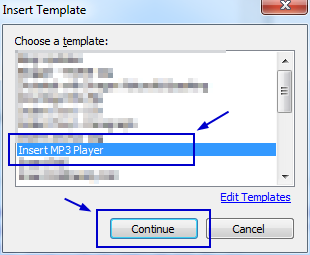
Windows Live Writer: Inserting/embedding a MP3

Windows Live Writer is a fantastic offline blogging tool with a WYSIWYG editor. It interfaces with just about any blog service [Blogger, LiveJournal, TypePad, WordPress, etc.] If you're a blogger you'll find this tool incredibly helpful- and it's refreshingly free from Microsoft.
I was knocking around the other day and started working with a music creator; I found the process of creating music really nice and I wanted to share the music in a blog post, but Windows Live Writer doesn't have a music import/link or any kind of way to have users link to a MP3 and leter readers just listen/stream the music directly from the site.
I checked the Windows Live Writer plug-in site. I found a plug-in to insert music, but it didn't' work; in fact it caused my version of Windows Live Writer to crash completely. Windows Live Writer was not liking the plug-in at all [or maybe the code it injected].
But I did find a better way to do it…
I have used a plug-in on Windows Live Writer several time and each time, it just seems to do the trick...

Blogger has seemingly changed it's API without telling anyone; or it's just broke.

I was reportng on one problem when I found two others. The Google blogger support forums are teaming with reports of people having problems with not being able to post to BLOGGER using outside applications like Zoundry Raven or Windows Live Writer.

There's a small range of problems right now; they're not being able to publish, not being able to pull old posts to edit them and the problem with the SLUG not being created properly. The problems are for sure a result of something that Google changed recently with the Blogger handling of remote posting applications; or basically, mucking with the base API that allows outside applications to post articles to BLOGGER.

The forums have been busy with reports for a couple of days and yet I've seen no responses from Google Blogger support over the issue; which isn't encouraging. You would really expect to see more participation from Google on issues of this nature.

Notice: Blogger is creating the wrong SLUG for Blogs

ctrl4ehiThis started like last week [or more]. People using Windows Live Writer and blogger may have noticed this; mainly because Windows Live Writer is the de facto standard for offline blogging.

Basically, the problem is that when people compose blogs and then submit them to their respective blogs to be posted, the SLUG or URL they uses is typically composed of the words use in the title of the blog post. and as of recently, this hasn't been happening with blogger.

Blogger is taking the first sentence of the blog, not the title, and creating the default SLUG or URL for the post. it's really nothing more than irritation, but it should get some notice because it doesn't create a very efficient SEO tagged blog post.

Windows Live Writer and Blogger Error

imageTrouble in paradise… That's what it is… Blogger users have been coming to the support forums in pours, reporting a problem with not being able to use Windows Live Writer with Blogger. This issue seems to be completely new.

The Error:

The HTTP response was missing the required Location header.

It just sounds ominous; right?

I'm in the same boat, my uplink to BLOGGER is broken too. We have to start looking to WHY Windows Live Writer can't post to BLOGGER; and from my experience— it's not anything that Windows Live Writer did; it's going to be blogger.

How to set a default FONT with Windows Live Writer 2011

pxeqq31oWindows Live Writer is a great application for offline bloggers and it’s even better for users that have absolutely no technical experience with blogs or HTML or CSS, but what Windows Live Writer doesn’t do is handle changing fonts on the blog.

Regardless of the blogging service [Blogger, LiveJournal, TypePad, WordPress, Etc.], Windows Live Writer doesn’t change that default font, BUT you can tell Windows Live Writer to use another font when your composing your blog post… essentially overriding the default FONT from the blog.

LinkWithin

Related Posts Plugin for WordPress, Blogger...